
For the last year, doing anything with sound on my Mac system has been a major hassle. This is due to a Digidesign bug that causes the Core Audio daemon to stop responding. When this happens, which is always and constantly, I have to trick my system into playing audio through my speakers. Otherwise I'm getting sound through the tiny speaker hidden in the PowerMac beneath my desk.
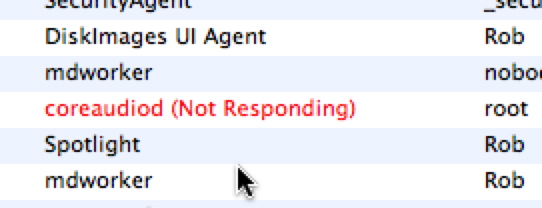
Despite tips suggested in this Apple Support thread and a known issue post at Digidesign Support, tricking my system (G5 PPC Dual 1.8 GHz, OS X 10.5.4) into playing sound involves the following steps:
1. Booting, or rebooting if the CoreAudio Manager has failed during use.
2. Launch Activity Monitor (Applications>Utilities>Activity Monitor).
3. Launch System Preferences and click through to Sound>Output.
4. Launch iTunes (as the quickest path to testing sound output).
5. Highlight "coreaudiod (Not Responding)" and click "Quit Process", enter admin password.
6. Verify that "Digidesign HW (003)" is selected as the output device.
7. Play a selection in iTunes, make sure the Digi 003 isn't muted and speakers are on.
8. If no sound, repeat.
That's a lot of process just to get system sound through the speakers. I must repeat this process if I need to use Pro Tools, because once you've activated the CoreAudio Manager, Pro Tools will think that it's still in use, even after you quit it.
This illustrates the complications of software-driven tools. If the Digi 003 rack was pure hardware (or at least it's input/output were hardware-driven), sound would work as soon as it had power, no fiddling with the OS. Pro Tools is one of the more complex softwares out there, and it feels like Digidesign has a touch of the Windows lack of simplicity. Considering the months to years they take to update Pro Tools for the latest Mac OS, it seems like the protocol could be simplified somewhere. Or rebuilt from the ground up? That said, Pro Tools is really money when it's working...

